Left-pointing white chevron arrow on a transparent background.
Back to article listing
Articles

Kensium POS 7.0: The Architecture Behind the Modernization

September 30, 2026
By-
Rahul Gedupudi
Kensium POS 7.0: The Architecture Behind the Modernization

What changed under the hood, what stayed the same, and what it means for technical buyers, existing customers on an upgrade path, and the partner channel.

Why the Architecture Changed

Kensium POS traces back to Fusion POS, acquired in 2023, with parts of the codebase more than twenty years old. The rewrite that became version 7.0 began in mid-2025, and it continues the existing version line rather than starting the numbering over, because the goal is to modernize a mature, proven platform rather than introduce an unproven one.

This article sets the two architectures side by side: what changed, what it means operationally, and how it affects the three audiences who have to plan around it. A technical evaluator needs to know what infrastructure the product actually requires. An existing customer needs to know what changes on day one and what stays the same. A partner fielding questions needs an accurate answer about how support and certification work under the new model.

The Legacy POS Architecture: Two Tiers, Seven Components
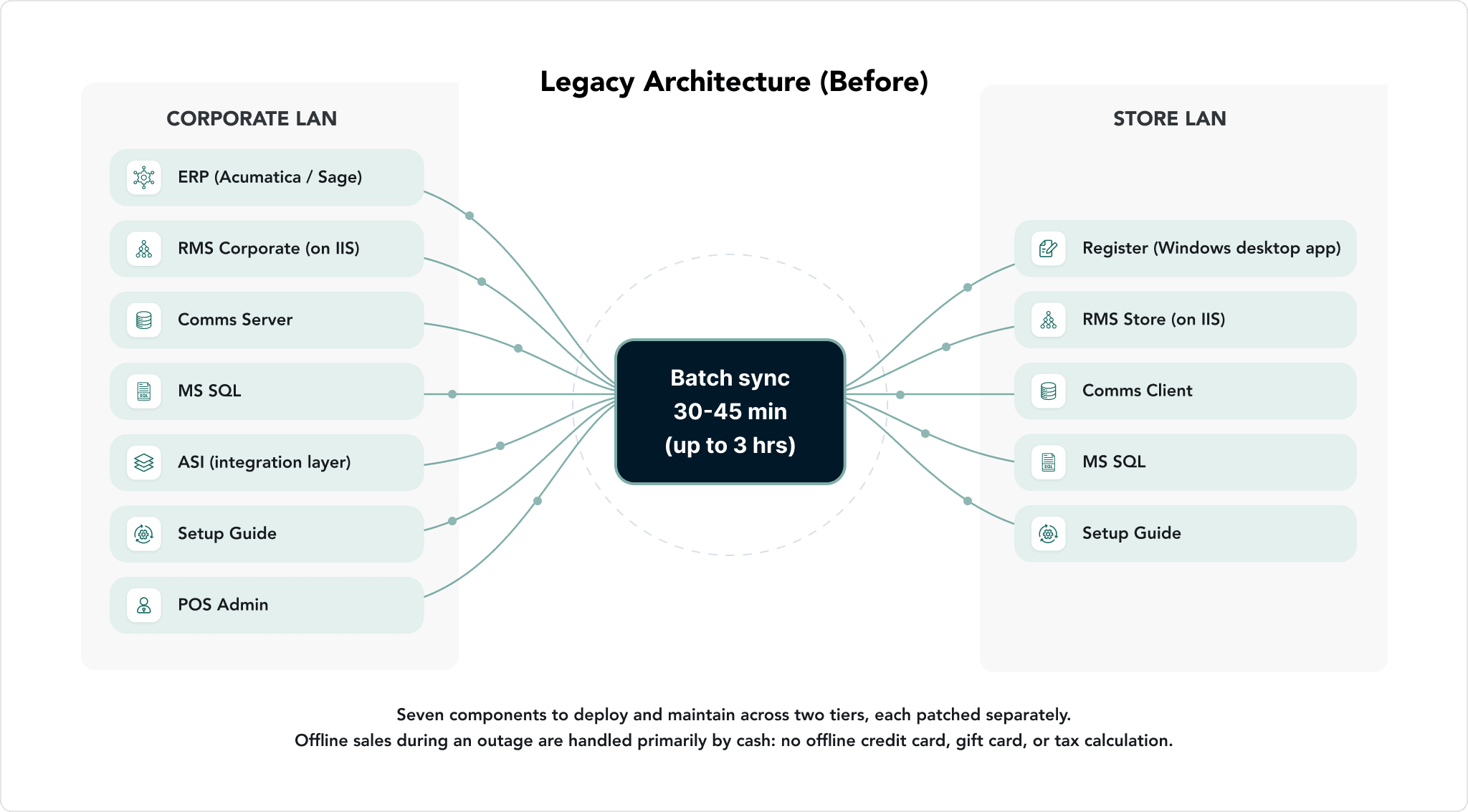
Legacy Kensium POS architecture with a Corporate LAN (ERP, RMS Corporate, Comms Server, ASI) and a Store LAN (Register, RMS Store, Comms Client)

The legacy platform runs a two-tier architecture. A Corporate LAN hosts the ERP, RMS Corporate on IIS, the Comms Server, MS SQL, the ASI integration layer, the Setup Guide, and POS Admin. A Store LAN hosts the Register, RMS Store on IIS, the Comms Client, its own MS SQL instance, and its own Setup Guide. The technology underneath is C++ with an MFC user interface for the register, .NET Framework 4.8, ASP.NET Core for RMS, a proprietary .NET Bridge for C++/.NET interop, and local gRPC.

• Seven components to deploy and patch separately across the two tiers, each with its own installer and its own update cycle.

• Batch synchronization: runs thirty to forty-five minutes, and up to three hours for large datasets, so store and corporate data are never more current than the last completed sync.

• No offline credit card, gift card, or tax calculation: during an outage, sales continue but are handled primarily by cash.

• Fragmented administration: provisioning, security, and configuration are handled by separate tools, and IIS Admin is required at the store level.

Kensium POS 7.0 Architecture: One Register, One Admin Surface
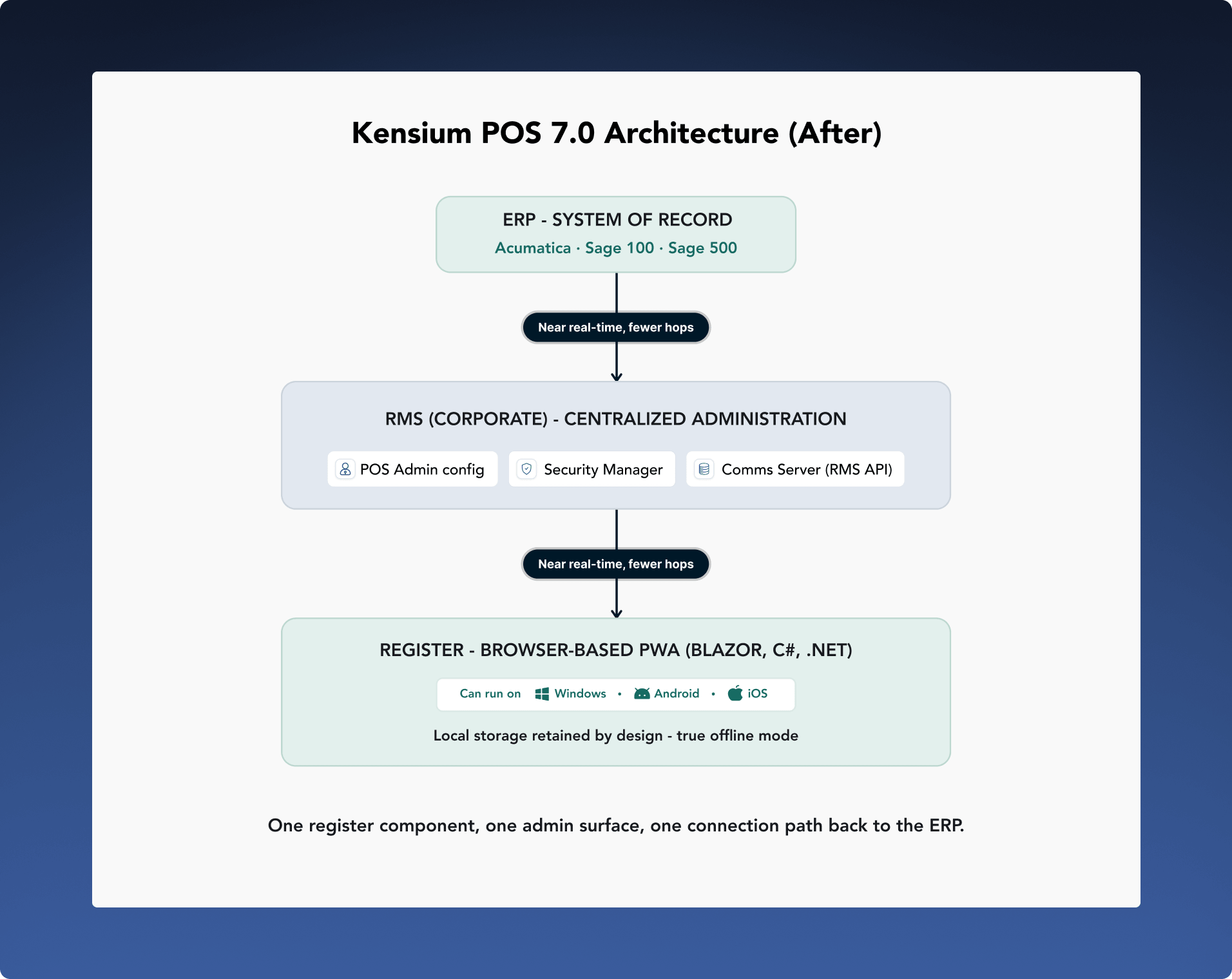
Kensium POS 7.0 architecture with the ERP, RMS Corporate and a browser-based Register

In 7.0, the ERP is the system of record for inventory, pricing, customer, and financial data. RMS (Corporate) centralizes administration: POS Admin configuration, Security Manager, and the Comms Server now operate as a single RMS API rather than separate services. The Register is a browser-based Progressive Web App built on Blazor, C#, and .NET, which is what allows it to be a product that can run on a range of devices rather than one tied to Windows. Local storage remains in the register by design, not as legacy baggage, because it is what makes true offline mode possible.

"Things will be synced, but how we do it, and how we reduce the hops and keep it near real time, is the key."

• One register component, one admin surface: POS Admin, Security Manager, and the Comms Server are consolidated into RMS, and the Setup Guide is absorbed into provisioning.

• Near-real-time synchronization: with far fewer hops between the register and the ERP, replacing the legacy batch-sync window.

• Can run on Windows, Android, and iOS: because the register is browser-based rather than a Windows-only desktop application.

• True offline mode by design: including credit card, gift card, and tax calculation. On reconnection, the longer a store was offline, the longer it takes to write the accumulated data back to the ERP; this is a real operational trade-off worth planning for, not a limitation to work around.

Legacy POS vs Kensium POS 7.0: Side-by-Side Comparison

Legacy POS vs Kensium POS 7.0 architecture comparison
Dimension Legacy Architecture (Before) Kensium POS 7.0 (After)
Register technology Windows desktop application, built on C++ with an MFC user interface. Browser-based PWA, built on Blazor, C#, and .NET. Can run on Windows, Android, and iOS.
Components to deploy Seven components to deploy and maintain across two tiers: Register, RMS Store, RMS Corporate, Comms Server, Comms Client, POS Admin, and Security Admin. Register and RMS (Corporate). POS Admin configuration, Security Manager, and Comms Server are consolidated into RMS, and the Setup Guide is absorbed into provisioning.
Administration Fragmented across separate tools for provisioning, security, and configuration. IIS Admin required at the store level. Centralized in RMS (Corporate). No store-level IIS administration.
Data synchronization Batch sync, thirty to forty-five minutes, and up to three hours for large datasets. Near-real-time synchronization, with far fewer hops between the register and the ERP.
Offline capability Sales continue during an outage, handled primarily by cash. No offline credit card, gift card, or tax calculation. True offline mode by design, including credit card, gift card, and tax calculation. On reconnection, the length of the outage affects how long it takes to write accumulated data back to the ERP.
Store-to-ERP relationship A separate integration layer (ASI) bridges the register and the ERP, with data reconciled between two systems. The ERP is the system of record. There is no second master inside the POS that needs reconciling: the register and the ERP share a single customer record, and the inventory count the register works from is the ERP's inventory count.
Underlying stack .NET Framework 4.8, ASP.NET Core for RMS, a proprietary .NET Bridge for C++/.NET interop, and local gRPC. C# and .NET 8, moving to .NET 10 LTS, on a single Visual Studio solution with EF Core and MS SQL.

Underlying stack detail is provided for technical evaluators; day-to-day operation does not require managing it directly.

What This Means for a Technical Buyer

The practical footprint of the product changes more than any single feature does. Instead of provisioning and patching seven components across two network tiers, an evaluator is assessing a single register component and a centralized RMS (Corporate) instance. Because the register runs in a browser, device procurement is no longer constrained to Windows hardware, though a certified device and browser matrix should be confirmed as part of any evaluation. Offline behavior is a design property of the register, not a workaround, which changes how a technical buyer should model outage risk: the open question to ask is not whether the register keeps functioning, but how long a full catch-up sync takes after an extended outage.

What This Means for an Existing Customer on an Upgrade Path

The ERP-Led POS™ model that Kensium POS 7.0 is built on means the register does not hold its own version of inventory, pricing, or customer records; it is a window into the ERP, not a separate system running alongside it. That does not change with the upgrade. What changes is the register itself, the administration model, and the synchronization behavior described above.

Migration is scoped individually, based on the number of stores and registers involved, in consultation with Kensium's implementation team; a customized environment or older hardware may add scope beyond a standard migration. Kensium has stated that legacy support winds down within one year of the 7.0 launch, so existing customers on Acumatica, Sage 100, or Sage 500 should treat a migration readiness conversation as a near-term planning item rather than an open-ended one.

What This Means for the Partner Channel

Support ownership follows a consistent model across the launch ERPs: Kensium owns the POS application and its integration with the ERP, while the customer's ERP partner or reseller owns issues that are native to the ERP itself. Certification for Sage 100 and Sage 500 covers the current release and the immediately prior major release, on-premises and cloud-hosted, and is retested against each newly certified release. For a standard, non-customized environment, implementation is typically measured in weeks; a customized environment is scoped individually by store and register count.

Partners fielding technical questions from a prospect or an existing customer can use the comparison table above as the accurate shape of the conversation: what is consolidating, what is not changing (the ERP remains the system of record), and where the real trade-off sits (reconnection catch-up time after an extended offline period).

A Note on Precision

Two phrases are used deliberately throughout this article. Synchronization is described as near real time with fewer hops, not as instant or live, because the register does not depend on a constant ERP connection to keep operating; that independence is what makes true offline mode possible in the first place. Device support is described as "can run on" Windows, Android, and iOS, reflecting the platform's capability, pending publication of a certified device and browser matrix.

Share this on
Black Facebook social media logo icon on transparent background.Twitter bird logo in light blue on a transparent background.LinkedIn social media platform icon in blue and white.
Written by
Rahul Gedupudi
Rahul applies his knowledge of technology systems and the industry to foster client relationships and identify new opportunities. When he's not working, Rahul enjoys endurance driving with the fastest cars he can get his hands on. He is a massive fan of German Formula 1 driver Michael Schumacher.
Left-pointing chevron arrow icon.
Back to Blogs

Kensium POS 7.0: The Architecture Behind the Modernization

POS & Retail
Reading Time:
3
min
Published on:
September 30, 2026
Updated on:
October 1, 2026
Kensium POS 7.0: The Architecture Behind the Modernization
Our Editorial Team
Rahul Gedupudi
CEO & Product Engagement

What changed under the hood, what stayed the same, and what it means for technical buyers, existing customers on an upgrade path, and the partner channel.

Why the Architecture Changed

Kensium POS traces back to Fusion POS, acquired in 2023, with parts of the codebase more than twenty years old. The rewrite that became version 7.0 began in mid-2025, and it continues the existing version line rather than starting the numbering over, because the goal is to modernize a mature, proven platform rather than introduce an unproven one.

This article sets the two architectures side by side: what changed, what it means operationally, and how it affects the three audiences who have to plan around it. A technical evaluator needs to know what infrastructure the product actually requires. An existing customer needs to know what changes on day one and what stays the same. A partner fielding questions needs an accurate answer about how support and certification work under the new model.

The Legacy POS Architecture: Two Tiers, Seven Components

Legacy Kensium POS architecture with a Corporate LAN (ERP, RMS Corporate, Comms Server, ASI) and a Store LAN (Register, RMS Store, Comms Client)

The legacy platform runs a two-tier architecture. A Corporate LAN hosts the ERP, RMS Corporate on IIS, the Comms Server, MS SQL, the ASI integration layer, the Setup Guide, and POS Admin. A Store LAN hosts the Register, RMS Store on IIS, the Comms Client, its own MS SQL instance, and its own Setup Guide. The technology underneath is C++ with an MFC user interface for the register, .NET Framework 4.8, ASP.NET Core for RMS, a proprietary .NET Bridge for C++/.NET interop, and local gRPC.

• Seven components to deploy and patch separately across the two tiers, each with its own installer and its own update cycle.

• Batch synchronization: runs thirty to forty-five minutes, and up to three hours for large datasets, so store and corporate data are never more current than the last completed sync.

• No offline credit card, gift card, or tax calculation: during an outage, sales continue but are handled primarily by cash.

• Fragmented administration: provisioning, security, and configuration are handled by separate tools, and IIS Admin is required at the store level.

Kensium POS 7.0 Architecture: One Register, One Admin Surface

Kensium POS 7.0 architecture with the ERP, RMS Corporate and a browser-based Register

In 7.0, the ERP is the system of record for inventory, pricing, customer, and financial data. RMS (Corporate) centralizes administration: POS Admin configuration, Security Manager, and the Comms Server now operate as a single RMS API rather than separate services. The Register is a browser-based Progressive Web App built on Blazor, C#, and .NET, which is what allows it to be a product that can run on a range of devices rather than one tied to Windows. Local storage remains in the register by design, not as legacy baggage, because it is what makes true offline mode possible.

"Things will be synced, but how we do it, and how we reduce the hops and keep it near real time, is the key."

• One register component, one admin surface: POS Admin, Security Manager, and the Comms Server are consolidated into RMS, and the Setup Guide is absorbed into provisioning.

• Near-real-time synchronization: with far fewer hops between the register and the ERP, replacing the legacy batch-sync window.

• Can run on Windows, Android, and iOS: because the register is browser-based rather than a Windows-only desktop application.

• True offline mode by design: including credit card, gift card, and tax calculation. On reconnection, the longer a store was offline, the longer it takes to write the accumulated data back to the ERP; this is a real operational trade-off worth planning for, not a limitation to work around.

Legacy POS vs Kensium POS 7.0: Side-by-Side Comparison

Legacy POS vs Kensium POS 7.0 architecture comparison
Dimension Legacy Architecture (Before) Kensium POS 7.0 (After)
Register technology Windows desktop application, built on C++ with an MFC user interface. Browser-based PWA, built on Blazor, C#, and .NET. Can run on Windows, Android, and iOS.
Components to deploy Seven components to deploy and maintain across two tiers: Register, RMS Store, RMS Corporate, Comms Server, Comms Client, POS Admin, and Security Admin. Register and RMS (Corporate). POS Admin configuration, Security Manager, and Comms Server are consolidated into RMS, and the Setup Guide is absorbed into provisioning.
Administration Fragmented across separate tools for provisioning, security, and configuration. IIS Admin required at the store level. Centralized in RMS (Corporate). No store-level IIS administration.
Data synchronization Batch sync, thirty to forty-five minutes, and up to three hours for large datasets. Near-real-time synchronization, with far fewer hops between the register and the ERP.
Offline capability Sales continue during an outage, handled primarily by cash. No offline credit card, gift card, or tax calculation. True offline mode by design, including credit card, gift card, and tax calculation. On reconnection, the length of the outage affects how long it takes to write accumulated data back to the ERP.
Store-to-ERP relationship A separate integration layer (ASI) bridges the register and the ERP, with data reconciled between two systems. The ERP is the system of record. There is no second master inside the POS that needs reconciling: the register and the ERP share a single customer record, and the inventory count the register works from is the ERP's inventory count.
Underlying stack .NET Framework 4.8, ASP.NET Core for RMS, a proprietary .NET Bridge for C++/.NET interop, and local gRPC. C# and .NET 8, moving to .NET 10 LTS, on a single Visual Studio solution with EF Core and MS SQL.

Underlying stack detail is provided for technical evaluators; day-to-day operation does not require managing it directly.

What This Means for a Technical Buyer

The practical footprint of the product changes more than any single feature does. Instead of provisioning and patching seven components across two network tiers, an evaluator is assessing a single register component and a centralized RMS (Corporate) instance. Because the register runs in a browser, device procurement is no longer constrained to Windows hardware, though a certified device and browser matrix should be confirmed as part of any evaluation. Offline behavior is a design property of the register, not a workaround, which changes how a technical buyer should model outage risk: the open question to ask is not whether the register keeps functioning, but how long a full catch-up sync takes after an extended outage.

What This Means for an Existing Customer on an Upgrade Path

The ERP-Led POS™ model that Kensium POS 7.0 is built on means the register does not hold its own version of inventory, pricing, or customer records; it is a window into the ERP, not a separate system running alongside it. That does not change with the upgrade. What changes is the register itself, the administration model, and the synchronization behavior described above.

Migration is scoped individually, based on the number of stores and registers involved, in consultation with Kensium's implementation team; a customized environment or older hardware may add scope beyond a standard migration. Kensium has stated that legacy support winds down within one year of the 7.0 launch, so existing customers on Acumatica, Sage 100, or Sage 500 should treat a migration readiness conversation as a near-term planning item rather than an open-ended one.

What This Means for the Partner Channel

Support ownership follows a consistent model across the launch ERPs: Kensium owns the POS application and its integration with the ERP, while the customer's ERP partner or reseller owns issues that are native to the ERP itself. Certification for Sage 100 and Sage 500 covers the current release and the immediately prior major release, on-premises and cloud-hosted, and is retested against each newly certified release. For a standard, non-customized environment, implementation is typically measured in weeks; a customized environment is scoped individually by store and register count.

Partners fielding technical questions from a prospect or an existing customer can use the comparison table above as the accurate shape of the conversation: what is consolidating, what is not changing (the ERP remains the system of record), and where the real trade-off sits (reconnection catch-up time after an extended offline period).

A Note on Precision

Two phrases are used deliberately throughout this article. Synchronization is described as near real time with fewer hops, not as instant or live, because the register does not depend on a constant ERP connection to keep operating; that independence is what makes true offline mode possible in the first place. Device support is described as "can run on" Windows, Android, and iOS, reflecting the platform's capability, pending publication of a certified device and browser matrix.

Our Editorial Team
Rahul Gedupudi
CEO & Product Engagement

Explore Related Blogs

caret right
How to Evaluate an ERP-Led POS™: A Buyer's Requirements Checklist
POS & Retail
POS Requirements Checklist for ERP Buyers | Kensium
Kensium POS 7.0: The Architecture Behind the Modernization
POS & Retail
POS Architecture: Legacy vs Kensium POS 7.0 | Kensium
Kensium POS 7.0: The ERP-Led POS for Acumatica and Sage
POS & Retail
Kensium POS 7.0: The ERP-Led POS for Acumatica and Sage